Is paid antivirus worth it? What Windows, macOS and Android already include, and what a subscription adds
Windows, macOS and Android ship a working antivirus, and six months of lab tests put paid suites within half a point of the free one. So what are you buying?
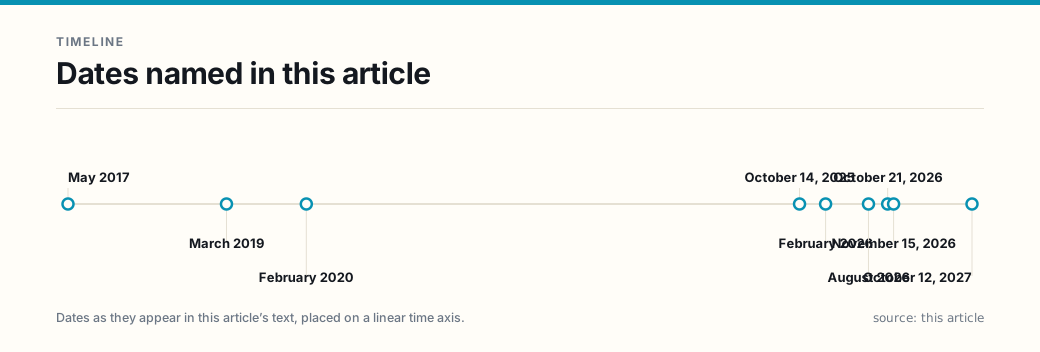
Paid antivirus is worth buying only when you want the bundle — not when you want better detection. Windows, macOS and Android each ship a working antivirus engine switched on before you install anything: Microsoft Defender Antivirus on Windows, XProtect with Gatekeeper and Notarization on macOS, Google Play Protect on Android. In AV-TEST’s six-month endurance test under Windows 11, published October 21, 2026, Microsoft’s built-in Defender detected all of the malware it was shown and finished with 17.7 of 18 points, while 6 of the 13 products tested reached the maximum 18. The same test found that 11 of the 13 could be chosen on protection alone. Detection is no longer what separates these products. What separates them is price, device count, renewal terms, and the extras — a VPN, a password manager, cloud backup, identity monitoring, a support line — and those extras can be bought one at a time.
There is a second fact that decides this purchase more than any lab score: installing a paid antivirus on Windows turns Defender off. Microsoft states it directly, and warns that running two real-time engines at once can cause problems. You are substituting one scanner for another, not adding a layer. So the honest question is not “is the paid scanner better” — the lab answer is “not by enough to see” — but “do I want what is in the box besides the scanner?”
This article is written for readers in the United States deciding whether to buy, and reading the claims on a security pop-up correctly. It is general information about consumer software, not security advice for a specific machine, and it surveys no vendor’s contract terms.
What antivirus is already installed, by default?
| Platform | What ships | Where the vendor says it is on by default | What it does not cover |
|---|---|---|---|
| Windows 10 / 11 | Microsoft Defender Antivirus, inside the Windows Security app | “free and is included in Windows, always on and always working to protect your PC against malware” | Stops no scam that talks you into typing a password; patches nothing the OS no longer receives |
| macOS | XProtect, Gatekeeper, Notarization | XProtect updates checked “daily” by default; Gatekeeper on by default | Apple: “XProtect scans only apps that have been changed or apps at first launch.” |
| Android | Google Play Protect | “on by default, but you can turn it off” | Scans at install plus periodic scans, not continuous file interception |
The Windows line is the one most readers doubt, so it is worth stating in Microsoft’s words rather than a summary: “Microsoft Defender Antivirus is free and is included in Windows, always on and always working to protect your PC against malware.” The company’s tamper-protection documentation adds that “Tamper Protection is turned on by default” and that it “helps prevent malicious apps from changing important Microsoft Defender Antivirus settings, including real-time protection and cloud-delivered protection” — but also that it “doesn’t affect how third-party antivirus apps work or how they register with Windows Security.” That last clause is the hinge the rest of this article turns on.
Does a paid product detect more malware?
Barely. AV-TEST, an independent German lab that runs a Windows round every two months and longer endurance tests, ran 13 consumer suites for six months — March to August 2026 — against “more than 800 samples of new zero-day malware and more than 35,000 known malware samples.” Its findings:
- 6 of the 13 scored the maximum 18 points, and 4 more scored 17.7 to 17.8.
- 9 of the 13 detected every sample in both the real-world and reference sets — and Microsoft was one of the nine, alongside Avast, AVG, Bitdefender, ESET, F-Secure, Kaspersky, Norton and TotalAV.
- Microsoft’s weak category was performance, not protection: 5.7 of 6, behind the seven suites that took the full 6. That arithmetic is where its 17.7 comes from — 6.0 for protection, 5.7 for performance, 6.0 for usability.
- Avira and K7 Computing finished at 17.3, and the thirteenth product, EnigmaSoft’s SpyHunter, was the only one AV-TEST singled out in the usability test for “filtering out harmless files or blocking normal programs,” scoring 4.7 of 6 there.
The lab’s own conclusion is the sentence to keep: “if users only want to pick an antivirus product based on its protection level, then they could pick from 11 out of 13 security packages, judging by their excellent scores.”
Two cautions about reading that number. First, it is a lab result for one six-month window; AV-TEST reruns its Windows round every two months and scores move — Microsoft’s January–February 2026 round was a perfect 18.0, its July–August round 17.5. Second, a 99.9% detection rate and a 100% detection rate are the same score in the table and not the same exposure over five years; no test establishes that any product is complete, and the Federal Trade Commission says as much in plain language: “Even if you use security software, malware might go undetected, at least temporarily.”
What happens to the free engine when you install a paid one?
It switches off. Microsoft’s consumer antivirus page: “Microsoft Defender Antivirus will turn off if you install another antimalware program to protect your PC,” followed by the practical warning that “It can cause problems on your computer to have two different antimalware products installed and running at the same time.” The Defender documentation describes the same behaviour from the other side: “If another antivirus product is installed and working, Microsoft Defender Antivirus turns itself off. The Windows Security app then shows the status of the other antivirus product in the Virus & threat protection section.”
That has three consequences a buyer should know before paying:
- There is no stacking. Buying a second engine does not give you two engines; it gives you the paid one.
- The free engine comes back if the paid one lapses. Microsoft documents that Defender “turns on if the other product is out-of-date, expired, or not working” — which is a reason a lapsing subscription is less dangerous than it sounds, and a reason not to pay for a “backup scanner.”
- The middle option exists but is weak. Windows can run “limited periodic scanning” alongside another product, but Microsoft says it “uses only a small part of Microsoft Defender Antivirus to find threats. It can’t detect most malware or unwanted software.” It is a second opinion, not a second engine.
What is the subscription actually selling?
This is where the decision is made, and Microsoft’s own product page is unusually candid about it. Its consumer app, Microsoft Defender, sits on top of Windows Security rather than replacing it: the FAQ says “Defender on Windows includes identity theft monitoring. Antivirus and anti-phishing is provided by Windows Security.” Its antivirus and anti-phishing scans carry a footnote that reads: “Does not replace existing malware protection on iOS and Windows devices.”
So what is in the box?
| What the suite sells | What it is | Cheaper or free alternative |
|---|---|---|
| A dashboard for every device in the household | Status and alerts in one place, including the status of a rival product you already run | We have found no free equivalent; this is the item on the list you cannot easily assemble yourself |
| Identity and credit monitoring | Dark-web and credit-file watching, restoration help | A security freeze and a free annual report; see our identity theft guide |
| A VPN | An allowance that varies by plan, from a few hundred megabytes to unlimited | Buy separately if you need one at all; our VPN guide covers when that is |
| A password manager | Vault, autofill, breach alerts | Several strong free options; see our password manager guide |
| Cloud backup | Usually a small allowance, occasionally 1–2 TB | Already inside a Microsoft 365 or iCloud plan you may be paying for |
| Phone support | A number to call during an infection | The FTC’s four removal steps, in order, free |
The dashboard is the honest reason to pay: a household whose four devices are managed in four different places does get real value from one screen. Everything else on that list is a separate purchase you can make deliberately — and one of them, the VPN, is worth reading our VPN guide about before you accept it bundled, because a VPN bundled into a security suite is doing a different job than the one its marketing describes.
Are you already paying for it?
Microsoft’s consumer app requires a subscription: “Yes, a Microsoft 365 Personal, Family or Premium subscription is required to use Microsoft Defender.” As displayed on November 15, 2026, Microsoft 365 Personal lists at $99.99 a year with a limited-time first-year price of $69.99, and Family at $129.99 a year for one to six people, each on up to five devices at once with 2 TB of shared storage. Family costs $30 a year more than Personal — about $5 a person at six people.
If you already pay for Microsoft 365 for Word, Excel and the storage, the security features are included, and there is nothing to decide. If you do not, you are being asked to buy an office suite to get a dashboard, and that is the moment to ask whether the dashboard is what you actually wanted.
What none of them does
Every product in this category is sold against a threat it cannot see. Four gaps are worth naming, because each one is where a reader’s actual loss comes from:
- It does not stop you from giving away a password. A fake login page served from a real-looking domain receives what you type, and the antivirus engine is never asked about the password you entered. The FTC’s control here is not software: “A hacker who steals your password can’t log in to your account without the second authentication factor.” Its password advice is to “Aim for at least 15 characters.”
- It does not patch an operating system that has stopped receiving fixes. Windows 10 support ended on October 14, 2025. Microsoft’s own page offers Extended Security Updates, which it says keep a Windows 10 PC receiving important security updates “until October 12, 2027,” or a move to Windows 11 — which requires TPM version 2.0 and firmware that is UEFI and Secure Boot capable. No antivirus supplies the missing patches.
- It does not bring files back. Ransomware’s leverage is a copy you cannot restore. That is a backup question, and a live sync folder is not a backup.
- It does not undo a decision you already made. If a remote-access session has been granted to a stranger, the loss is the session, not a file the scanner could quarantine.
The five checks before you pay
- Is the built-in engine actually on? Open Windows Security, confirm real-time protection and tamper protection are on, and confirm no forgotten trial antivirus from a laptop’s factory image is registered — a lapsed trial is a common way people end up with less protection than they think.
- What are you buying that is not detection? Name it out loud. If the answer is “the dashboard” or “the identity monitoring,” you have a real reason. If the answer is “better protection,” the lab data says the gap is a few tenths of a point.
- Do you already own the parts? A Microsoft 365, iCloud or Google One subscription, a password manager, a VPN, a backup drive. Price the bundle against the pieces you already have, not against the pieces in the ad.
- What does year two cost? Compare the renewal price to the first-year price before you enter a card. The intro price is a marketing number; the renewal is the number.
- How many devices, and whose? Per-device pricing is where a household decision goes wrong. Count phones and tablets, not just PCs, and check the platform limits — Microsoft’s own footnote on its antivirus scans reads “Does not replace existing malware protection on iOS and Windows devices.”
When the paid suite is the right purchase
There are real cases, and they are not the ones the ads describe:
- You are the household’s IT department for people who will not read a settings screen. One dashboard with an alert when a family member’s device reports a problem is worth more than a marginally better scanner.
- You want identity monitoring and will not place a freeze yourself. That is a labour purchase. Our identity theft guide explains what federal law already gives you free, including the freeze, so buy the labour with your eyes open.
- You want one renewal, not five. Consolidating a VPN, a password manager and backup into a single line item is a legitimate preference; price the bundle against the pieces you already own before you agree to it.
- You are buying for a small business with compliance obligations. Different question, different rules; this article is about households.
And the cases where it is the wrong purchase: because a pop-up told you so; because a friend said Windows “has no antivirus”; because a review site ranked a suite first — check whether that ranking is affiliate-funded before you weigh it; or because your PC is on an operating system that stopped getting patches.
How to tell a scan result from a sales pitch
The claim “your computer is infected” is one the Federal Trade Commission has repeatedly treated as deceptive under the FTC Act, and the enforcement record is specific enough to be a shopping test.
In March 2019 the FTC announced that Office Depot and its software supplier Support.com would pay $35 million — $25 million and $10 million respectively — over a program called PC Health Check. The Commission alleged that “the actual results presented to consumers were based entirely on whether consumers answered ‘yes’ to four questions they were asked at the beginning of the PC Health Check program,” including whether the computer ran slow, received virus warnings, crashed often, or displayed pop-up ads, and that “the scan had no connection to the ‘malware symptoms’ results.” The proposed order “prohibits Office Depot from making misrepresentations about the security or performance of a consumer’s electronic device.”
The pattern is not historic. The FTC’s May 2017 Operation Tech Trap announcement described “16 new actions,” bringing its total to 29 in a year, against operations that put up pop-ups resembling security alerts — some “even included a countdown clock, allegedly representing the time remaining before the computer hard drive would be deleted” — and sold “anti-virus protection or software” among the unnecessary services. In February 2020 the Commission began sending “57,960 refunds averaging about $30 each,” totaling more than $1.7 million, to victims of one such scheme.
The rule that follows is short: a warning that arrives inside a web page, an email, or a phone call is an advertisement, not a diagnosis. The FTC says to never call a phone number that appears in a pop-up window. A real detection appears in the operating system’s own security machinery — the Windows Security panel, or a Gatekeeper or XProtect alert — and not in a web page, an email or a phone call.
If you think you are infected, in this order
The FTC’s sequence is worth following exactly, because the order matters more than the tool:
- Stop signing in. “Immediately stop logging into online accounts with your usernames, passwords, or other sensitive information” — banking and shopping first. Anything typed after an infection may be captured.
- Update the security software you already have, or install one if you have none, and let it update before scanning. A scanner with stale definitions is a scanner that looks at yesterday.
- Run the scan. Windows Security and XProtect both do this without a purchase; XProtect’s remediation engine removes what it finds, though as Apple notes, “XProtect doesn’t automatically restart the Mac,” so finish the job.
- Rotate credentials and turn on two-factor authentication, on the assumption that the malware had access.
If the device will not come clean, the FTC’s remaining options are the manufacturer’s warranty line, a support company you know, or someone you trust — and note what is not on that list: a number from a pop-up.
The one-sentence answer
Buy a paid security suite when what you want is household management or identity monitoring and you have priced the pieces you already own — not because its scanner detects more, since in a six-month lab test published October 21, 2026 Microsoft’s free Defender detected all of the malware and 11 of 13 products could be chosen on protection alone, and installing any of them switches Defender off; and if your reason is a pop-up that says you are infected, close it, because that is the claim the FTC has repeatedly litigated.
Related guides
- Is a paid VPN worth it? — the VPN that comes bundled here, judged on its own merits.
- Do you need a password manager? — the control that covers the gap no antivirus covers.
- Two-factor authentication: how to set it up — the second factor the FTC names.
- Is identity theft protection worth it? — what federal law already gives you, before you buy monitoring.
- How to spot phishing — the delivery route the FTC names first.
- Backing up your data — the control that survives ransomware.
Frequently asked questions
- Do I need to buy antivirus for a Windows PC?
- Not for detection. Microsoft ships Microsoft Defender Antivirus with Windows and describes it as 'free and is included in Windows, always on and always working to protect your PC against malware.' In AV-TEST's six-month endurance test under Windows 11, published October 21, 2026, Microsoft detected all of the malware in both the real-world and reference sets and finished with 17.7 of 18 points; 6 of the 13 products tested reached the maximum 18. AV-TEST's own summary is that 'if users only want to pick an antivirus product based on its protection level, then they could pick from 11 out of 13 security packages.'
- What happens to Windows Defender if I install a paid antivirus?
- It turns off, automatically. Microsoft's support page states: 'Microsoft Defender Antivirus will turn off if you install another antimalware program to protect your PC,' and adds that 'It can cause problems on your computer to have two different antimalware products installed and running at the same time.' Microsoft's Defender documentation puts it the other way round: 'If another antivirus product is installed and working, Microsoft Defender Antivirus turns itself off.' You are replacing one real-time engine with another, not stacking two.
- So what does a paid antivirus actually add?
- Management and monitoring, plus a bundle. Microsoft's own product page is the clearest example: its footnote says the Defender app 'Does not replace existing malware protection on iOS and Windows devices,' and its FAQ says that on Windows 'Antivirus and anti-phishing is provided by Windows Security' — the paid app adds identity theft monitoring and a cross-device dashboard. Other suites sell a VPN, a password manager, cloud backup, parental controls and support. Each of those can be bought separately, and several are already free.
- Is the free antivirus on a Mac real antivirus?
- Yes, by Apple's own description: 'macOS includes built-in antivirus technology called XProtect for the signature-based detection and removal of malware,' and 'By default, macOS checks for these updates daily.' Apple documents three layers — App Store and notarized Gatekeeper to stop malware launching, Gatekeeper and Notarization plus XProtect to block it running, and XProtect to remediate what already executed. XProtect is signature-based and scans apps at first launch or when they change, so it is narrower than a full real-time scanner.
- Does Android need antivirus?
- Android ships with one. Google's support page says 'Google Play Protect checks apps when you install them. It also periodically scans your device,' and warns that 'Google Play Protect is on by default, but you can turn it off.' What Google describes is scanning at install time plus periodic scans of the device, not continuous file-level interception of the kind a desktop suite performs.
- Is antivirus worth it if I have already been infected?
- A scan is step three of four, not step one. The Federal Trade Commission's malware guidance orders the steps: stop logging into accounts with your usernames, passwords or other sensitive information; update your security software and run a scan; then change your passwords and turn on two-factor authentication, in case the malware gave someone access. The FTC also says plainly that 'Even if you use security software, malware might go undetected, at least temporarily.'
- A pop-up said my computer is infected. Should I buy the cleaner it is selling?
- No. The FTC's guidance is to never call a phone number that appears in a pop-up window, and its cases show why the claim itself is regulated: in March 2019 Office Depot and Support.com agreed to pay $35 million over a 'PC Health Check' program whose malware finding was triggered by the customer answering yes to any of four screening questions, not by the scan. The FTC's 2017 Operation Tech Trap produced 16 new actions in one announcement and brought its total to 29 in a year.
- How much does the paid tier cost, and is it already in something I buy?
- Microsoft's consumer security app requires a Microsoft 365 subscription: Personal lists at $99.99 a year (a limited-time first-year price of $69.99 was showing on November 15, 2026) and Family at $129.99 a year for one to six people, each on up to five devices at once. If you already pay for Microsoft 365 for Word, Excel and the 1 TB of storage, the security features are already included and there is nothing to decide.
- Should I buy antivirus for a Windows 10 PC that cannot run Windows 11?
- That is the wrong purchase. Windows 10 support ended on October 14, 2025, and Microsoft's own end-of-support page offers two routes: enroll in Extended Security Updates, which it says keeps a Windows 10 PC receiving important security updates until October 12, 2027, or move to Windows 11 — which requires TPM version 2.0 and firmware that is UEFI and Secure Boot capable. Antivirus software does not patch an operating system that no longer receives fixes.
Sources
Each source is a primary or official reference, checked before publication. Links open the original.
- Microsoft Support, 'Consumer antivirus software providers for Windows' — 'If you're running a supported version of Windows, you've already got Microsoft Defender Antivirus built in, helping to protect you against viruses, spyware, and other malware.'; 'Microsoft Defender Antivirus is free and is included in Windows, always on and always working to protect your PC against malware.'; 'Microsoft Defender Antivirus will turn off if you install another antimalware program to protect your PC. Before you install antimalware software, check to make sure you don't already have another 3rd party antimalware product on your computer. If you do, be sure to remove the product you don't want before you install the new one. It can cause problems on your computer to have two different antimalware products installed and running at the same time.' (support.microsoft.com/en-us/security/consumer-antivirus-software-providers-for-windows retrieved November 15, 2026)
- Microsoft Support, 'Prevent changes to security settings with Tamper Protection' — 'Tamper Protection in Windows Security helps prevent malicious apps from changing important Microsoft Defender Antivirus settings, including real-time protection and cloud-delivered protection.'; 'Tamper Protection doesn't affect how third-party antivirus apps work or how they register with Windows Security.'; 'Tamper Protection is turned on by default.' (support.microsoft.com/en-us/topic/6fd8d8ff-0e6d-4df5-b994-ea4df20ca969 retrieved November 15, 2026)
- Microsoft Learn, 'Use limited periodic scanning in Microsoft Defender Antivirus' — 'By default, Microsoft Defender Antivirus turns on when no other antivirus product is installed on a Windows 10 or Windows 11 device. It also turns on if the other product is out-of-date, expired, or not working.'; 'If another antivirus product is installed and working, Microsoft Defender Antivirus turns itself off. The Windows Security app then shows the status of the other antivirus product in the Virus & threat protection section.'; limited periodic scanning 'uses only a small part of Microsoft Defender Antivirus to find threats. It can't detect most malware or unwanted software.' (learn.microsoft.com/en-us/defender-endpoint/limited-periodic-scanning-microsoft-defender-antivirus retrieved November 15, 2026)
- AV-TEST, '13 security packages under Windows 11 in the six-month endurance test' (published October 21, 2026) — 13 consumer suites from Avast, AVG, Avira, Bitdefender, EnigmaSoft, ESET, F-Secure, K7 Computing, Kaspersky, McAfee, Microsoft, Norton and TotalAV, tested March to August 2026 against 'more than 800 samples of new zero-day malware and more than 35,000 known malware samples' (250 new zero-day samples per round plus a 12,000-sample reference set); '6 out of the 13 products scored 18 points – the highest score possible – and 4 products followed closely behind with scores ranging from 17.7 to 17.8 points.'; '9 out of the 13 products examined passed the test with flying colors, detecting all of the malware both in the real-world test and from the reference set. The best performing products in this category came from Avast, AVG, Bitdefender, ESET, F-Secure, Kaspersky, Microsoft, Norton and TotalAV.'; ESET, F-Secure, Microsoft and TotalAV 'achieved very good results ranging from 17.7 to 17.8 points'; 'if users only want to pick an antivirus product based on its protection level, then they could pick from 11 out of 13 security packages, judging by their excellent scores.' (av-test.org/en/news/13-security-packages-under-windows-11-in-the-six-month-endurance-test retrieved November 15, 2026)
- AV-TEST, product report for Microsoft Defender Antivirus (Consumer) 4.18 under Windows 11, July–August 2026 round — Protection 6.0 of 6.0, Performance 5.5 of 6.0, Usability 6.0 of 6.0, a total of 17.5 of 18; AV-TEST awards its TOP PRODUCT mark at 17.5 points or higher. The January–February 2026 report for the same product shows 6.0 points in all three categories, a total of 18.0. (av-test.org/en/antivirus/home-windows/windows-11/august-2026/microsoft-defender-4.18-261414 retrieved November 15, 2026)
- Apple, Apple Platform Security, 'Protecting against malware in macOS' — 'macOS includes built-in antivirus technology called XProtect for the signature-based detection and removal of malware. The system uses YARA signatures, a tool used to conduct signature-based detection of malware, which Apple updates regularly.'; 'By default, macOS checks for these updates daily.'; 'By default, Gatekeeper helps ensure that all downloaded software has been signed by the App Store or signed by a registered developer and notarized by Apple.'; the three layers: 'Prevent launch or execution of malware: App Store, or Gatekeeper combined with Notarization', 'Block malware from running on customer systems: Gatekeeper, Notarization, and XProtect', 'Remediate malware that has executed: XProtect'; 'XProtect scans only apps that have been changed or apps at first launch.'; 'XProtect doesn't automatically restart the Mac.' (Apple Platform Security guide, PDF at help.apple.com/pdf/security/en_US/apple-platform-security-guide.pdf pages 120–122, retrieved November 15, 2026)
- Google, 'Use Google Play Protect to check your apps' — 'Google Play Protect checks your apps and devices for harmful behavior.'; 'It runs a safety check on apps from the Google Play Store before you download them.'; 'It checks your device for potentially harmful apps from other sources.'; 'Google Play Protect checks apps when you install them. It also periodically scans your device.'; 'Important: Google Play Protect is on by default, but you can turn it off. For security, we recommend that you always keep Google Play Protect on.' (support.google.com/googleplay/answer/2812853 retrieved November 15, 2026)
- Microsoft, 'Microsoft Defender' consumer product page and FAQ — 'Microsoft Defender' is a 'cross-device app' while 'Windows Security (formerly known as Windows Defender Security Center) is security built into Windows to help protect your device and data'; 'Defender on Windows includes identity theft monitoring. Antivirus and anti-phishing is provided by Windows Security.'; 'Do I need a Microsoft 365 subscription to use Defender? Yes, a Microsoft 365 Personal, Family or Premium subscription is required to use Microsoft Defender.'; footnote 6 on the anti-phishing and antivirus scans: 'Does not replace existing malware protection on iOS and Windows devices.'; pricing displayed November 15, 2026: Microsoft 365 Personal $99.99 a year with a limited-time first-year price of $69.99, Microsoft 365 Family $129.99 a year for 1 to 6 people with each person on up to 5 devices simultaneously and 2 TB of shared storage (microsoft.com/en-us/microsoft-365/microsoft-defender-for-individuals retrieved November 15, 2026)
- Microsoft, 'End of support for Windows 10, Windows 8.1, and Windows 7' — 'Windows 10 reached end of support on October 14, 2025.'; 'On October 14, 2025, Windows 10 support ended.'; 'Extended Security Updates (ESU) will ensure your Windows 10 PC continues to receive important security updates until October 12, 2027.' (microsoft.com/en-us/windows/end-of-support retrieved November 15, 2026)
- Microsoft, 'Windows 11 Specs and System Requirements' — minimum requirements list Processor at '1 gigahertz (GHz) or faster with 2 or more cores on a compatible 64-bit processor or System on a Chip (SoC)', RAM at '4 gigabytes (GB)', Storage at '64 GB or larger storage device', System firmware at 'UEFI, Secure Boot capable', and TPM at 'Trusted Platform Module (TPM) version 2.0' (microsoft.com/en-us/windows/windows-11-specifications retrieved November 15, 2026)
- Federal Trade Commission, 'Malware: How To Protect Against, Detect, and Remove It' — 'Malware is harmful software that's installed on your device without your knowledge. Viruses, spyware, and ransomware are common types of malware.'; 'Even if you use security software, malware might go undetected, at least temporarily.'; on fake warnings: 'Scammers create fake security warnings that tell you to call a phone number for tech support. If you call, they ask for remote access to your computer, run a fake diagnostic test, then charge you to fix a problem that doesn't exist. Never call a phone number that appears in a pop-up window.'; the four removal steps: 'Immediately stop logging into online accounts with your usernames, passwords, or other sensitive information', 'Update your security software to make sure you have the latest protections', 'Run a security scan to remove the malware', and 'Change your passwords and enable two-factor authentication in case the malware gave a hacker access to your accounts' (consumer.ftc.gov/articles/malware-how-protect-against-detect-and-remove-it retrieved November 15, 2026)
- Federal Trade Commission, 'Protect Your Personal Information From Hackers and Scammers' — 'Criminals look for weak points to exploit before software companies can fix them. So, update the software programs on your computer, tablet, and mobile phone as soon as possible when a newer version comes out.'; 'Turn on automatic updates to automatically update your security software, internet browser, operating system, mobile apps'; on passwords, 'If you create your own password, make it long. Aim for at least 15 characters.'; 'A hacker who steals your password can't log in to your account without the second authentication factor.'; 'The more secure types of two-factor authentication are an authenticator app or a security key.' (consumer.ftc.gov/articles/protect-your-personal-information-hackers-and-scammers retrieved November 15, 2026)
- Federal Trade Commission, press release, 'Office Depot and Tech Support Firm Will Pay $35 Million to Settle FTC Allegations That They Tricked Consumers into Buying Costly Computer Repair Services' (March 2019) — 'Office Depot has agreed to pay $25 million while its software supplier, Support.com, Inc., has agreed to pay $10 million'; 'the actual results presented to consumers were based entirely on whether consumers answered 'yes' to four questions they were asked at the beginning of the PC Health Check program. These included questions about whether the computer ran slow, received virus warnings, crashed often, or displayed pop-up ads or other problems that prevented the user from browsing the Internet.'; 'the scan had no connection to the 'malware symptoms' results'; the proposed settlement 'prohibits Office Depot from making misrepresentations about the security or performance of a consumer's electronic device' (ftc.gov/news-events/press-releases/2019/03/office-depot-tech-support-firm-will-pay-35-million-settle-ftc-allegations-they-tricked-consumers retrieved November 15, 2026)
- Federal Trade Commission, press release, 'FTC and Federal, State and International Partners Announce Major Crackdown on Tech Support Scams' (May 2017) — 'the FTC and its partners are announcing 16 new actions, including complaints, settlements, indictments, and guilty pleas, against deceptive tech support operations. This brings to 29 the number of law enforcement actions brought by Operation Tech Trap partners in the last year'; 'Some of the pop-up ads even included a countdown clock, allegedly representing the time remaining before the computer hard drive would be deleted.'; 'the defendants would persuade consumers to pay hundreds of dollars for unnecessary computer repair services, service plans, anti-virus protection or software, and other products and services' (ftc.gov/news-events/news/press-releases/2017/05/ftc-federal-state-international-partners-announce-major-crackdown-tech-support-scams retrieved November 15, 2026)
- Federal Trade Commission, press release, 'FTC Sends Refund Checks to Tech Support Scam Victims' (February 2020) — the Commission began sending 'refunds totaling more than $1.7 million' and 'will begin providing 57,960 refunds averaging about $30 each' to victims of a scheme that operated under Click4Support and other names (ftc.gov/news-events/press-releases/2020/02/ftc-sends-refund-checks-tech-support-scam-victims retrieved November 15, 2026)